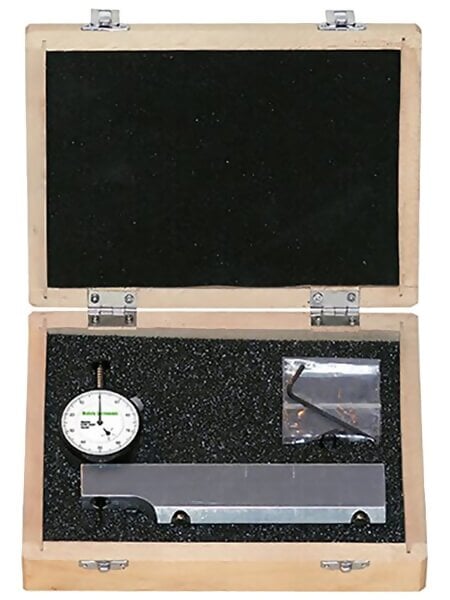
Western Instruments N88-6M Reaching Plus Magnetic Pit Depth Gauge 6" Blade
Western Instruments Pit Gauges assure compliance with vessel, pipeline, tank and OCTG specifications for corrosion and erosion depth measurement.
Measuring Range: 0.0-0.5" (0.0 - 12.7 mm)
Resolution: 0.001" (0.01 mm)
Dial Diameter: 1.4" (35.5 mm)
Center-mount 6in (152mm) Blade
Available with dial or digital indicators
Western Instruments Pit Depth Gauges allow the Corrosion Inspector to conveniently measure Pit Depth or material loss in areas of Weight-Loss Corrosion.Various Blades for the Pit Gauges are available for different applications, including the Bridging Pit Gauge which permits Inspectors to Span or Cantilever over large areas of Weight-Loss Corrosion, to get a true measure of Pit Depth
Kit Contents
- Western Instruments N88-6M Reaching Plus Magnetic Pit Gauge
- 6" (152mm) Blade with Two(2) magnet cartridges
- Operator Instructions
- Carrying Case
Features
Zeroing Dial Indicator
- To quickly check the Zero Point of the Dial indicator, place the Blade on a representative smooth surface.
- Gently press the Plunger, until the contact point touches the surface.
- While the contact point is on the surface, loosen the Bezel Lock, and rotate the Bezel Scale until it reads '0' with respect to the pointer.
- Loosen the Fastener(s) holding the Dial Indicator in place.
- Hold the Blade firmly on a Flat Surface, and gently press the body of the Dial Indicator down until the contact point touches the flat surface.
- Carefully re-tighten the Clamp Fastener(s) or the Set Screw.
- Any fine zeroing can be done by rotating Bezel Scale on the Indicator.
- Height Zeroing should be done, whenever the unit is put into to use.
- Digital Indicators can be Height Zeroed or Positioned in the same way as a Mechanical Dial Indicator.
- To Zero the Digital Indicator simply press the Zero Button when the Contact Point is on a reference point. If the Digital Indicator is Height Zeroed, press Zero when the Plunger is fully retracted.
- To select Metric or Imperial Measurement, simply press the mm/in Button.Whennot in use, press the On/Off Button to turn the Indicator off.
- The position (or rotation) of the Dial indicator can be changed by simply loosening the Clamp Fasteners or Set Screw, and rotate the Dial Indicator about the Blade.
- After the Dial Indicator is rotated, the unit should be Dial Zeroed.
Specifications
Dial and Digital Indicators
 Measuring Corrosion (Depth)
* Western offers a variety of Contact Points, which are all 0.625" (16mm) long. Any ADG Contact point can be used with our special dial indicators, but a different length may affect Height Zeroing, or the vertical position of the Dial Indicator. Contact Points are easily replaced, by extending the Contact Point , and turning it counter clockwise.
Related Products
N88-12
Reference Pit Gauge- 5.5" (140mm) long, 0.75" (19mm) wide with inverted V Edge, 2 magnet cartridges. Similar and interchangeable with Bridging Pit Gauge Main Blade.
Downloads